




 Previous

Before connecting, check the Contact ID of the other party.
 In the Features screen, press the [
 ] [
] [ ] key to select [Video Meeting], and then press the [Enter] key.
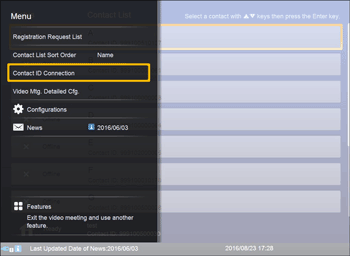
 Press the [Menu] key/
 .
.
 Press the [
 ] or [
 ] key to select [Contact ID Connection], and then press the [Enter] key.
 Press the cursor keys ([] [] [] [] keys) to select the Contact ID.
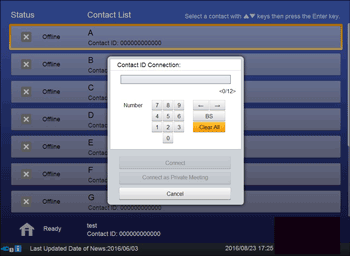
 Press the cursor keys ([] [] [] [] keys) to select [Connect] or [Connect as Private Meeting], and then press the [Enter] key.
The meeting begins when the other party answers the call.
For details about Private Meeting, see Restricting Meeting Participants.

You can use the speaker volume keys to adjust the volume of the tone when initiating a call. For details about how to adjust the volume, see Adjusting the Speaker Volume.


