




 Previous
You can adjust the zoom of the machine's camera to change the area displayed or magnification.
There are five different zoom levels. The zoom levels change in the following order: ×1, ×1.5, ×2, ×3, and ×4.
 Press the [Zoom
 ] or [Zoom
 ] key to change the zoom level.
The zoom switches to the next level each time the zoom key is pressed.
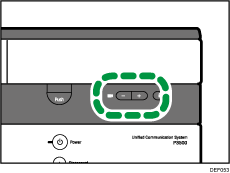

The zoom level selected last remains enabled until the machine power is turned off.
When the machine power is turned on, the zoom level is reset to ×1.
If you use a video input device such as an external camera, you cannot use the zoom keys to change the zoom level.


