


 Previous
 Specify the meeting code.
The meeting code must be a four-digit number.
If you want to have a private meeting with multiple contacts, share the meeting code with the other parties in advance.
If you want to have a private meeting with a contact only, you do not need to share the meeting code with the other party.
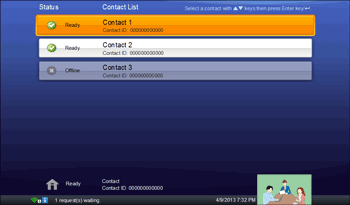
Press the [ ] or [
 ] key to select the contact you want to have a meeting with, and then press the [Enter] key/
 .
.
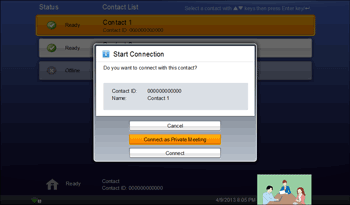
 Press the [] or [] key to select [Connect as Private Meeting], and then press the [Enter] key/.
 Press the cursor keys ([] [] [
 ] [
] [ ] keys) to select the meeting code specified in Step 1, and then press the [Enter] key/.
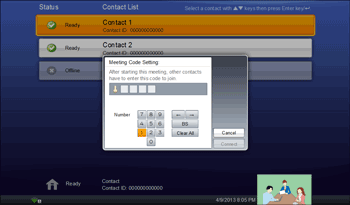
 Press the cursor keys ([] [] [] [] keys) to select [Connect], and then press the [Enter] key/.
The meeting begins when the other party answers the call.
The status of the contacts that are having a private meeting is "Meeting".

You can use the speaker volume keys to adjust the volume of the tone when initiating a call. For details about how to adjust the volume, see Adjusting the Speaker Volume.


