


 Previous
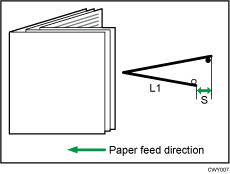
Adjust the fold position (S) of half folded sheets when using the multi-folding unit.
This setting will be applied if the multi-sheet fold function is enabled.
Press [ ] to increase and [
 ] to reduce (S).
The  mark indicates the leading edge (relative to the paper feed direction), and the
  mark indicates the trailing edge.
Setting Items |
Default Value |
Max. Value |
Min. Value |
Step |
Unit |
|---|---|---|---|---|---|
A3 B4 JIS A4 B5 JIS SRA3 SRA4 310×432mm 226×310mm 13×191/5 13×19 13×18 123/5×191/5 123/5×181/2 12×18 11×17 81/2×14 81/2×11 8K Other Paper Sizes |
0.0 |
4.0 |
|
0.2 |
mm |


