


 Previous
 Press the [User Tools] key.
 Press [System Settings].
 Press [Administrator Tools].
 Press [Display / Clear / Print Counter per User].
 Select a user code from the left side of the display.
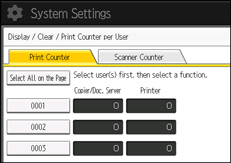
Press [Select All on the Page] to select all user codes on the page.
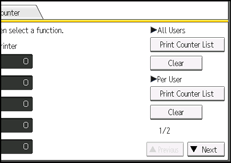
 Press [Print Counter List] under "Per User".
Enter the user code, and then press the [ ] key if the user code is registered.
 Select some of the following functions you want to print counters:
[Copier], [Printer], [Scanner], and [Total Prints] (on Type 1, 2 and 3 machines)
[Printer Counter] and [Total Prints] (on Type 4 and 5 machines)
 Press [Print].
 Press [Exit].
 Press the [User Tools] key.

For details on how to access System Settings, see Accessing User Tools.


