


 Previous
The specified staple position varies depending on paper feed and print data orientation. The following table shows the staple positions:
Paper Orientation on the Machine |
Print Data Direction |
Staple Position |
|
|---|---|---|---|
Finisher SR4110/ Finisher SR4090 |
Booklet Finisher SR4100 |
||
|
Portrait |
|
|
Landscape |
|
|
|
|
Portrait |
|
|
Landscape |
|
|
|


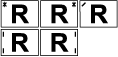
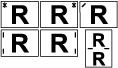

Stapling might not be in the specified position if combine (layout) and 2 sided printing are both selected. After setting the staple position, use the printer driver's preview icon to check the position before printing.


