


 Previous
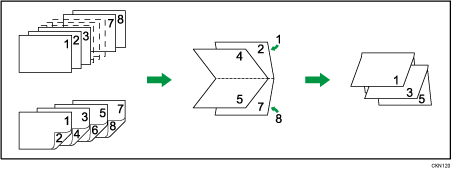
This section explains how to print documents and bind them in the center using the printer driver.
If the PCL 6 printer driver is used, booklet printing can be specified in the [Edit] menu on the [Detailed Settings] tab. If the PCL 5c printer driver is used, it can be specified in the [Setup] tab. For printing methods, see the printer driver Help.

The paper types that can be used for booklet printing are as follows:
Plain, Recycled, Letterhead, Preprinted, Prepunched, Yellow, Green, Blue, Ivory, Orange, Pink, Red, Gray, Coated (Glossy), Coated (Matted)
Magazine

If the information icon (
 ) is displayed next to the "Booklet:" list, you cannot specify booklet printing. Click the information icon () to check why booklet printing is unavailable.
If the document contains pages with different original sizes, page breaks may occur.
By combining the booklet printing and combine printing functions, you can print multiple pages onto a single sheet and bind them to form a booklet. For details about combine printing, see Combining Multiple Pages into Single Page.


