


 Previous
This section explains the items on the [Recall from Paper Library] screen.
This screen appears when you press [Recall from Paper Library] on the [Edit Custom Paper] screen.
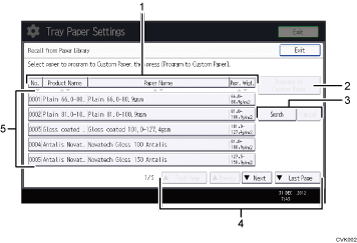
[No.], [Product Name], [Paper Name], and [Papr. Wigt.]
Press the item to be used for the sorting.
[Program to Custom Paper]
Press this key to register the selected paper from the list as a custom paper. For details, see Selecting the Paper's Name from the Paper Library and Selecting the Paper's Type from the Paper Library.
[Search], [Cancel]
Press [Search] to search the papers in the paper list. Press [Cancel] to return to the paper list from the search results. For details, see Searching for a Paper by Specifying the Conditions.
[
 First Page], [Previous], [
 Next], [Last Page]
Displays the first, previous, next, or last page of the list.
List of papers in the library
The registration numbers, product names, paper names, and weights of library's papers are displayed in the list.

The contents in the paper library on your machine might differ slightly from those shown in the illustrations in this manual.


