Bovenste pagina > Papierspecificaties en papier bijvullen > Papier plaatsen > Papier in de handinvoerlade plaatsen > Afdrukken vanaf de handinvoer met de printerfunctie > Normale formaten instellen via het bedieningspaneel
Druk op de [Gebruikersinstellingen/Teller]-knop.
Druk op [Instell. papierlade].
Druk op [].
Druk op [Printer handinvoer papierformaat].
Selecteer het papierformaat.
Druk op [OK].



 Vorige
 Druk op de [Gebruikersinstellingen/Teller]-knop.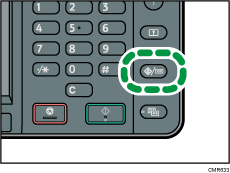
 Druk op [Instell. papierlade].
 Druk op [
 ].
]. Druk op [Printer handinvoer papierformaat].
 Selecteer het papierformaat.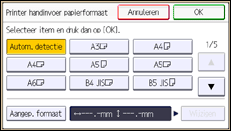
 Druk op [OK].
 Druk op de [Gebruikersinstellingen/Teller]-knop.

