


 Previous
 Press [Store File].
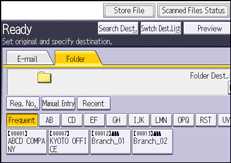
 Make sure that [Store to HDD + Send] is selected.
 If necessary, specify the stored file's information, such as [User Name], [File Name], and [Password].
User Name
Press [User Name], and then select a user name. To specify an unregistered user name, press [Manual Entry], and then enter the name. After specifying a user name, press [OK].
File Name
Press [File Name], enter a file name, and then press [OK].
Password
Press [Password], enter a password, and then press [OK]. Re-enter the password for confirmation, and then press [OK].
 Press [OK].
 Specify the setting for sending the file by Scan to Folder, and then send the file.
For details about sending a file by Scan to Folder, see Basic Procedure When Using Scan to Folder .
.
 Press the [Start] key.

Depending on the security setting, [Access Privileges] may appear instead of [User Name]. For details about specifying [Access Privileges], see Specifying Access Privileges for Stored Files
.You can resend stored files by Scan to Folder. To resend stored files, select the files on the Select Stored File screen, and then send them. For details, see Sending a Stored File
.


