




Front View
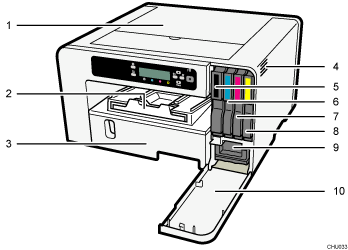
Top Cover
Normally, keep this cover closed. If you cannot locate paper jams, or jammed paper cannot be removed easily, you can check the condition of paper from the top of the machine.
Output Ramp
Prints are delivered on the output ramp.
Pull out when using large paper to keep the printed paper from falling.
Tray 1
Load paper here.
 (mainly North America)
If you want to print on paper larger than A4 or letter size, pull the tray extension out.
Vent
Air is vented here to prevent the inside of the machine from getting too warm. Do not lean anything against the vent or block it in any way. If the inside of the machine gets too warm, a breakdown could occur.
Print Cartridge (black)
Print Cartridge (cyan)
Print Cartridge (magenta)
Print Cartridge (yellow)
Ink Collector Unit
Right Front Cover
Normally, keep this cover closed. Open this cover only when you need to install or replace the print cartridge or the ink collector unit.

