


Modificare i titoli
 Precedente
Questa sezione descrive come modificare i titoli.
 Premere il tasto [Strumenti utente/Contatore].
 Premere [Impost.di Sistema].
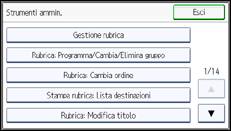
 Premere [Strumenti amministr.].
 Premere [Rubrica: Modifica titolo].
 Premere il tasto associato al titolo da modificare.
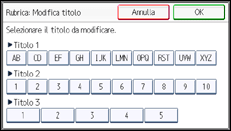
 Inserire il nuovo nome e premere [OK].
 Premere [OK].
 Premere il tasto [Strumenti utente/Contatore].

Per informazioni su come accedere alle Impostazioni di Sistema, vedere Accedere a Strumenti utente.


