Top Page > Copy/ Document Server > Basic Copying > Adjusting Copy Image Density > Manual Image Density
You can adjust the density of the overall original in nine steps.
Press [Orig.].
If [Auto Density] is selected, press [Auto Density] to cancel it.
Press [] or [] to adjust the image density.
The density indicator "" moves.
Press [OK].



 Previous
 Press [Orig.].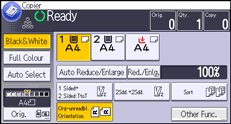
 If [Auto Density] is selected, press [Auto Density] to cancel it.
 Press [
 ] or [
 ] to adjust the image density.
 " moves.
 Press [OK].

