




Deleting Stored Print files
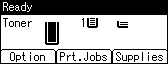
 Press [Prt.Jobs].
 Select [Stored Print Jobs] using the [
 ] or [
 ] key, and then press [Job List].
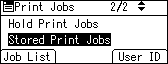
Depending on the security settings, certain print jobs may not be displayed.
 Select the file you want to delete using the [] or [] key, and then press [Delete].
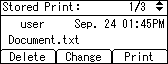
If you set the password in the printer driver, enter the password to delete.
If you forget your password, contact your administrator for help.
 Press [Delete].
To cancel deleting, press [Cancel].

