




Checking the Status Information
Click the [Status] tab on the main page to display system information, paper tray status and toner levels.
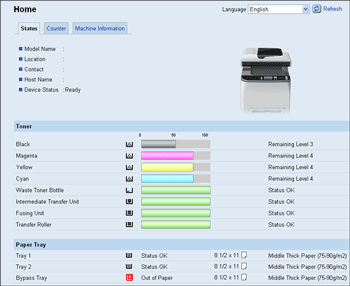
Item |
Description |
|---|---|
Model Name |
Shows the name of the machine. |
Location |
Shows the location of the machine as registered on the [SNMP] page. |
Contact |
Shows the contact information of the machine as registered on the [SNMP] page. |
Host Name |
Shows the host name specified in [Host Name] on the [DNS] page. |
Device Status |
Shows the current messages on the machine's display. |
Item |
Description |
|---|---|
Black |
Shows the amount of black toner remaining. |
Magenta |
Shows the amount of magenta toner remaining. |
Yellow |
Shows the amount of yellow toner remaining. |
Cyan |
Shows the amount of cyan toner remaining. |
Waste Toner Bottle |
Shows the remaining life of the waste toner bottle, as “Status OK”, “Almost Full” or “Full”. |
Intermediate Transfer Unit |
Shows the remaining life of the transfer unit, as “Status OK”, “Replacement Required Soon” or “Replacement Required”. For replacing, contact your sales or service representative. |
Fusing Unit |
Shows the remaining life of the fusing unit, as “Status OK”, “Replacement Required Soon” or “Replacement Required”. For replacing, contact your sales or service representative. |
Transfer Roller |
Shows the remaining life of the transfer roller, as “Status OK”, “Replacement Required Soon” or “Replacement Required”. For replacing, contact your sales or service representative. |
Item |
Description |
|---|---|
Tray 1 |
Shows the current state and paper size/type setting of tray 1. |
Tray 2 |
Shows the current state and paper size/type setting of tray 2. |
Bypass Tray |
Shows the current state and paper size/type setting of the bypass tray. |

The information about tray 2 appears only when it is installed.
The information about intermediate transfer unit, fusing unit, and transfer roller appear only for the Type 2 model.
If non-genuine print cartridges are installed, toner life cannot be reliably indicated.

For details about the machine’s location and contact information, see Configuring the SNMP Settings
 .
.For details about the machine’s host name, see Configuring the DNS Settings
.

