












 Manuals
 Contents
 Previous
 Next
Next


| | | |
| |||
| |||
| | | |
| ManualsContentsPreviousNext | | |
Makes copies onto custom size paper from the bypass tray.

The Duplex function cannot be performed on custom size paper. If [1 Sided  2 Sided] is selected, cancel the setting.
Open the bypass tray, and then insert the paper face down until you hear the beep.
Align the paper guides to the paper size.
Press [Bypass], and then press the [ ] key.
Press [Paper Size].
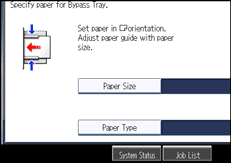
Press [Custom Size].
Enter the horizontal size with the number keys, and then press [].
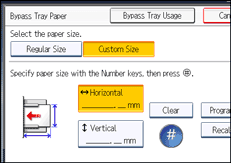
Enter the vertical size with the number keys, and then press [].
Press [OK] twice.
Place the originals, and then press the [Start] key.

To change the value you entered, press the item you want to change, and then enter a new value.
You can register a custom paper size. For details, see “Registering a custom size”. You can also recall the registered custom paper size. For details, see “Recalling the registered custom size”.
 |
 | Copyright (C) 2011 |

