




Top Page > Network and System Settings Reference > Connecting the Machine > Connecting to the Interface > Connecting to the Ethernet Interface  (mainly North America)
Connecting to the Ethernet Interface (mainly North America)
This section describes how to connect an Ethernet cable to the Ethernet interface.

If the main power switch is on, turn it off.
Use the following Ethernet cables:
Unshielded Twisted Pair Cable (UTP) or Shielded Twisted Pair Cable (STP) and Category type 5 or more
 Make sure the main power is switched off.
 Connect the Ethernet interface cable to the 10BASE-T/100BASE-TX port.
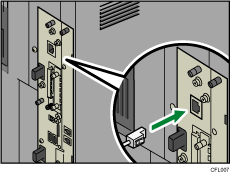
 Connect the other end of the Ethernet interface cable to a network connection device such as a hub.
 Turn on the main power switch of the machine.
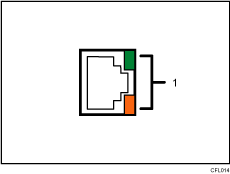
Indicators
When 100BASE-TX or 10BASE-T is operating, the green LED is lit and the orange LED flashes. If the machine is not connected to the network, both LEDs are turned off.

For details about how to turn on the main power switch, see "Turning On/Off the Power", About This Machine.
For details about installing the printer driver, see "Preparing the Machine", Printer Reference.

