




 Manuals
 Contents
 Previous
 Next
Next


| | | |
| |||
| |||
| | | |
| ManualsContentsPreviousNext | | |
Replace all the parts included in the Maintenance Kit at the same time. To replace them, follow the procedure below:
Turn off the power, and then unplug the power cable.
Check the box contains the following items:
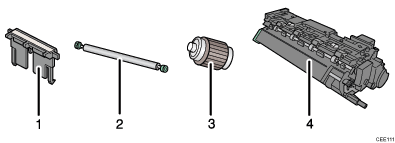
Friction Pad × 3
Transfer Roller (with gloves)
Paper Feed Roller × 3
Fusing Unit
 |
 | Copyright (C) 2010 |
