




 Manuals
 Contents
 Previous
 Next
Next


| | | |
| |||
| |||
| | | |
| ManualsContentsPreviousNext | | |
Paper type setting using the control panel |
The [Menu] key > [Paper Input] > [Paper Type: Tray2] or [Paper Type: Tray3], or [Paper Type: Bypass Tray] > [Envelope] > the [OK] key |
Paper type setting using the printer driver |
[Envelope] |
Supported input tray |
This paper type can be printed only from the tray 2 and tray 3, and bypass tray. To print on envelopes from Tray 2 or Tray 3, use the envelope feeder unit. |
Duplex printing |
Not supported |
Note |
|

Load envelopes with the print side down in the envelope feeder.
Load envelopes with flaps closed to the left side of the tray. Also, configure the printer driver to rotate the print object 180 degrees.
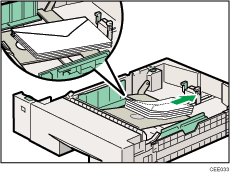
Load envelopes with the print side facing up on the bypass tray.
Load envelopes with flaps closed to the left side of the tray. Also, configure the printer driver to rotate the print object 180 degrees.
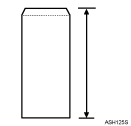
To correctly specify the length of an envelope whose flap opens along its short edge, be sure to include the open flap when measuring.
 |
 | Copyright (C) 2010 |
