




 Manuals
 Contents
 Previous
 Next
Next


| | | |
| |||
| |||
| | | |
| ManualsContentsPreviousNext | | |

|

Do not subject the card to physical shocks.
To use the following functions, the optional 256 MB SDRAM module must be installed.
VM card
ELP-NX card
The optional SDRAM module must be installed to use the IPDS card.
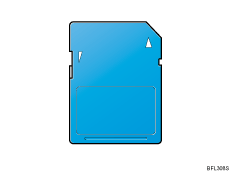
Check the contents of the package.
Turn off the power, and then unplug the power cord.
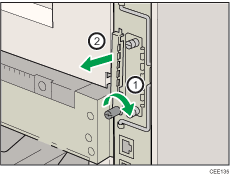
Remove the one screw, and then carefully remove the cover of the SD card slot.
Carefully push in the SD card (notched corner downward and leading), it clicks into place.
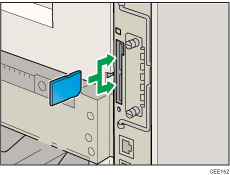
If you insert only one SD card, use the upper slot. If you insert two SD cards simultaneously, use both slots. If you insert the optional VM card, use only the lower slot.
The SD card supplied with the optional hard disk can be used in either of the two slots.
If you want to use three or more SD cards simultaneously, consult your service representative.
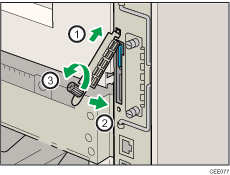
Reattach the cover over the SD card. Fasten the one screw to secure the cover.
If ELP-NX card is inserted in the printer, the installation automatically starts when the printer is turned on. After the installation is completed, restart the printer.

Do not touch the card while the printer is in use. It may come loose, even if pushed only slightly. The slot cover must be reattached.
You can confirm that the SD card was installed correctly by checking the control panel menu. Depending on the SD card, certain menu items appear on the display.
SD card supplied with the optional hard disk: Make sure [Machine Data Encryption] appears in [Security Options]. Depending on settings, [Machine Data Encryption] might not appear. For details about how to confirm this setting, consult your administrator.
IPDS card: Make sure [IPDS Menu] appears under [Print Settings].
NetWare card: Make sure [NetWare] appears in [Effective Protocol] under [Network].
ELP-NX card: Press the [Switch Functions] key, and then confirm the name of ELP-NX appears in [JavaTM/X].
If the card is not installed properly, repeat the procedure from the beginning. If it cannot be installed correctly even after reattempting installation, contact your sales or service representative.
For details about printing the configuration page, see Test Printing.
 |
 | Copyright (C) 2010 |
