




 Manuals
 Contents
 Previous
 Next
Next


| | | |
| |||
| |||
| | | |
| ManualsContentsPreviousNext | | |

Before touching the SDRAM module, ground yourself by touching something metal to discharge any static electricity. Static electricity can damage the SDRAM module.
Do not subject the SDRAM module to physical shocks.
The printer comes equipped with 256 MB of memory. This can be expanded to a maximum of 512 MB.
Turn off the power of the printer, and then unplug the power cable and interface cable.
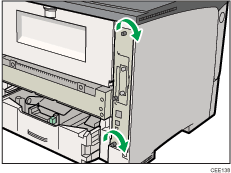
Remove the two screws holding the controller board in place.
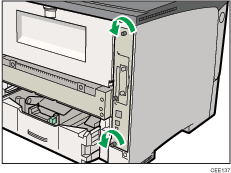
The removed screws are required to fasten the controller board.
Pull out the handle of the controller board.
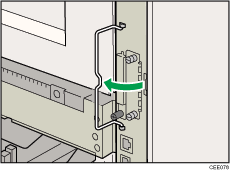
Pull the handle, and then slide the controller board out.
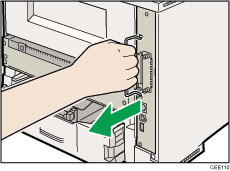
Place the controller board on a flat surface.
The SDRAM module is installed in the slot shown in the illustration below.
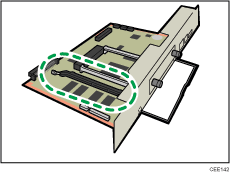
To install the recommended memory, align the notch of the recommended memory with the protruding part of the vacant slot, and then carefully insert the module at an angle.
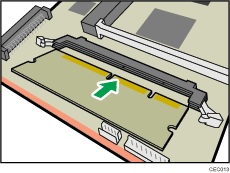
Keeping the module at an angle, press it down until it clicks into place.
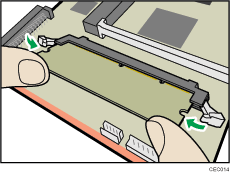
Match the controller board to the top and bottom rail using the " " mark, and then slide it into the printer slowly until it stops.
The printer may malfunction if the controller board is not properly installed.
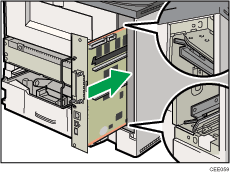
Push the handle of the controller board until it clicks.
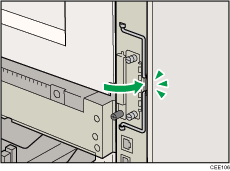
Fasten the controller board to the printer with the two screws.

After finishing the installation, you can check the SDRAM module is properly installed: Print the configuration page from the [List/Test Print] menu. If it is installed properly, the memory capacity will appear under "Total Memory" on the configuration page.
The table below shows the total SDRAM module capacities.
Standard |
Extended |
Total |
|---|---|---|
256 MB |
128 MB |
384 MB |
256 MB |
256 MB |
512 MB |
If the SDRAM module is not properly installed, repeat this procedure. If you cannot install it properly even after reinstallation, contact your sales or service representative.
Install the controller board carefully to prevent any malfunction.
For details on printing the configuration page, see Test Printing.
 |
 | Copyright (C) 2010 |
