




 Manuals
 Contents
 Previous
 Next
Next


| | | |
| |||
| |||
| | | |
| ManualsContentsPreviousNext | | |

|

|
|
|
|

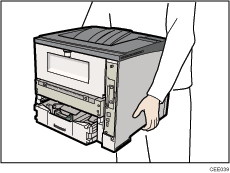
Do not grip on the tray area when lifting the printer.
When four paper feed units are installed, they are detected as "Tray 2" and "Tray 3", starting from the upper unit.
Tray 1 is required to print using the optional paper feed unit. Without Tray 1, paper jams will occur.
Do not grip on the tray area when lifting the printer.
Check the package contains the following:
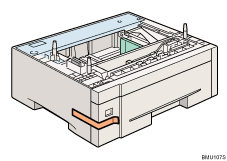
Turn off the printer's power switch, and then unplug the printer's power cord from the wall outlet.
Remove the adhesive tape from the optional paper feed unit.
Lift the printer using the inset grips on both sides of the printer.
There are three upright pins on the optional paper feed unit. Align them with the holes on the underside of the printer, and then carefully lower the printer.
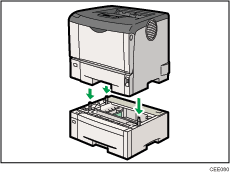
After installing the option, print the configuration page to confirm the installation.

When moving the printer, remove the paper feed unit.
After finishing the installation, you can check whether the paper feed unit is properly installed by printing the configuration page from the [List/Test Print] menu. If the paper feed unit is properly installed, "Tray 2" and "Tray 3" will appear for "Attached Equipment" on the configuration page.
If the paper feed unit is not installed properly, reinstall it following this procedure. If you cannot install it properly even after attempting reinstallation, contact your sales or service representative.
If the print area is not centered correctly, adjust the printing position for the optional paper feed unit. For details, see Adjusting Tray Registration.
For details about printing the configuration page, see Test Printing.
For details about loading paper onto the paper tray, see Loading Paper in Trays.
After a new paper feed unit has been installed, the driver settings might need to be reconfigured. For details, see "Making Option Settings for the Printer", Driver Installation Guide.
To attach two paper feed units at the same time, first stack them one upon the other, and then attach them as a single unit.
 |
 | Copyright (C) 2010 |
