




 Manuals
 Contents
 Previous
 Next
Next


| | | |
| |||
| |||
| | | |
| ManualsContentsPreviousNext | | |
To protect it from shock and vibration during transit, this printer comes packaged in cushioning foam and secured with tape. Remove these protective materials after bringing the machine to where it will be installed.

|
|

|
|
|
|
|
|

Removed tape is dirty. Be careful not to let it touch your hands or clothes.
Do not grip on the tray area when lifting the printer.
Do not allow paper clips, staples, or other small metallic objects to fall inside the printer.
Keep the uncovered print cartridge away from direct sunlight.
When you use this printer for the first time, use the print cartridge packaged with the printer.
Be sure to remove the tape completely before installing the print cartridge. Otherwise, the printer might be damaged.
If you pull out the strips when the print cartridge is slant or standing on its side, the cartridge might cause trouble with the printer.
Be sure to pull the tape horizontally. Pulling it upward or downward may cause the toner to scatter.
After pulling the tape out of the cartridge, toner scatters easily. Do not shake the cartridge.

Print cartridge (consumables) are not covered by warranty. However, if there is problem, contact the store where they were purchased.
Remove the plastic bag.
Lift the printer by using the inset grips on both sides of the printer.
Leave the tape holding the paper feed tray and cover in place while moving the printer. Lower the machine slowly and carefully to prevent trapping your hands.
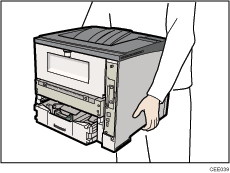
When moving the printer, do not hold on the following parts as doing so could cause a malfunction:
The handle onto the standard paper feed tray.
The underside of the bypass tray.
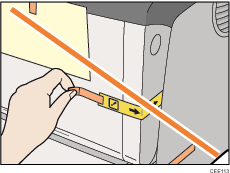
Remove the adhesive tape.
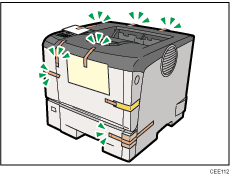
Do not remove the tape shown in the illustration.
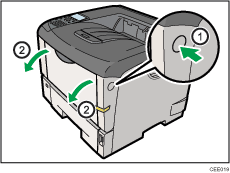
Open the front cover by pushing the front cover release button.
Remove the packing material inserted between the print cartridge and the printer.
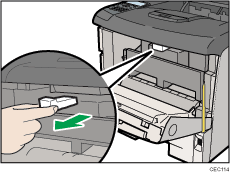
Lift the front side of the print cartridge, and then pull it out of the printer.
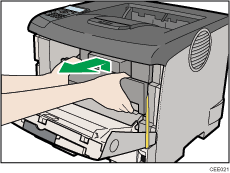
Do not hold the print cartridge upside down or stand it vertically.
Do not place the print cartridge on an unstable or tilted surface.
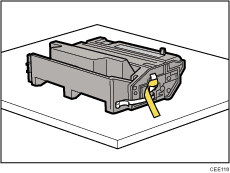
Place the print cartridge on a flat surface. Remove the tape as shown in the illustration.
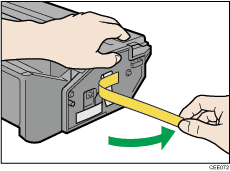
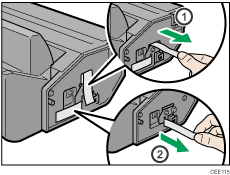
Pull out the tape from inside the unit horizontally while holding the cartridge with one hand as shown in the illustration.
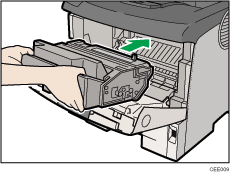
Hold the grips of the print cartridge, and then insert it into the printer until it stops.
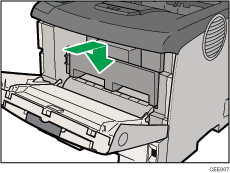
Push down the print cartridge to secure it in the appropriate position.
Close the front cover.
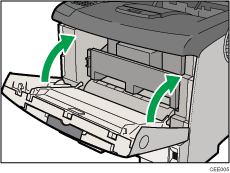
Do not close the front cover with force. If you cannot close the cover easily, pull out the print cartridge from the printer and insert it again. After that, close the front cover again.
Dispose of removed fixing material and tape in the same manner as ordinary plastic waste.
 |
 | Copyright (C) 2010 |
