




Registering the adjusted colour balance
 Press [Edit / Colour].
 Press [Colour], and then press [Adjust Colour].
 Adjust the colour balance.
 Press [Program Colour Balance].
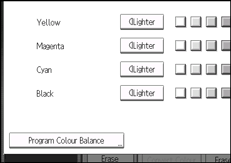
 Press [Program].
 Select a program number (1
  3).
3).
 Press [OK] twice.

If you select the program number key where
 is displayed, the previously registered settings will be overwritten.
For details about how to adjust the colour balance, see Colour Balance
 .
.

