











 Manuals
 Contents
 Previous
 Next
Next


| | | |
| |||
| |||
| | | |
| ManualsContentsPreviousNext | | |
For your convenience, we recommend you install these manuals on your computer.
Insert the CD-ROM in the CD-ROM drive of your computer.
Click [Install manuals].
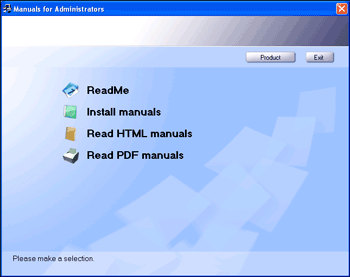
Install the HTML manuals by following the on-screen instructions.
When the installation is complete, click [Finish].
Click [Exit].
Open the HTML manuals that you installed.
To open the manuals from an icon, double-click the icon on the desktop. To open the manuals from the [Start] menu, point to [All Programs] (Windows 2000: [Programs]), and then [Product Name].
Click the title of the manual you want to read.

You need administrator permissions to install the manuals. Log in as an Administrators group member.
The system requirements for installing the manuals are as follows:
Operating system: Windows 2000/XP/Vista/7, Windows Server 2003/2003 R2/2008/2008 R2
Minimum display resolution: 800 × 600 pixels
Hyperlinks might not work and referenced sections might not appear unless all the HTML manuals have been installed. To display referenced sections, be sure to install all the HTML manuals.
If you cannot install a manual, copy the “MANUAL_HTML” folder to your computer's hard drive, and then run “setup.exe”.
To delete an installed manual, on the [Start] menu, click [All Programs] (Windows 2000: [Programs]), then [Product Name], and then uninstall the data.
Depending on the settings made during installation, menu folder names may differ.
 |
 | Copyright (C) 2011 |
