




Reproduction Ratio
This section describes the user tools in the Reproduction Ratio menu under Copier / Document Server Features.
Shortcut Reduce/Enlarge
You can register up to three frequently used Reduce/Enlarge ratios other than the fixed Reduce/Enlarge ratio and have them shown on the initial display.
You can also change registered Reduce/Enlarge ratios.
When you select [User Reduce/Enlarge Ratio], the ratio can be set from 25 to 400%, using the number keys.
Default for “F1”: [71%]
Default for “F2”: [141%]
Default for “F3”: [93%]
Reproduction Ratio
You can specify the enlargement and reduction ratios that appear if [Reduce / Enlarge] is pressed on the copier screen.
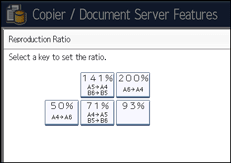
A4
 A6 (50%)
A4
A5, B5 JIS B6 JIS (71%)93%
A5
A4, B6 JIS B5 JIS (141%)A6
A4 (200%)User Reduce/Enlarge Ratio (25
 400%)
400%)
Reduce/Enlarge Ratio Priority
You can set the ratio with priority when [Reduce / Enlarge] is pressed.
Default: [71%]
Ratio for Create Margin
You can set a Reduce/Enlarge ratio when registering Create Margin in a shortcut key.
Enter a ratio using number keys (in the range of 90 to 99%).
Default: [93%]

