




Network
This section describes the user tools in the Network menu under Interface Settings.
Machine IPv4 Address
Specify the machine's IPv4 network address.
Default: [Auto-Obtain (DHCP)]
When you select [Specify], enter the IPv4 address and subnet mask as "xxx.xxx.xxx.xxx" ("x" indicates a number).
When you select [Specify], make sure that IPv4 address is different from that of other machines on the network.
The physical address (MAC address) also appears.
IPv4 Gateway Address
A gateway is a connection or interchange point between two networks.
Specify the gateway address for the router or host computer used as a gateway.
Default: [000.000.000.000]
Machine IPv6 Address
Displays the machine's IPv6 network address.
Link-local Address
The machine's specified link-local address appears.
Manual Configuration Address
The machine's manually configured address appears.
Stateless Address: 1-5
The specified stateless address appears.
IPv6 Gateway Address
Displays the machine's IPv6 gateway address.
IPv6 Stateless Address Autoconfiguration
Specify IPv6 Stateless Address Autoconfiguration.
Default: [Active]
DNS Configuration
Make settings for the DNS server.
Default: [Auto-Obtain (DHCP)]
When you select [Specify], enter the DNS Server IPv4 address as "xxx.xxx.xxx.xxx" ("x" indicates a number).
DDNS Configuration
Specify the DDNS settings.
Default: [Active]
Domain Name
Specify the domain name.
Default: [Auto-Obtain (DHCP)]
When you select [Specify], enter the domain name using up to 63 characters.
WINS Configuration
Specify the WINS server settings.
Default: [On]
If [On] is selected, enter the WINS Server IPv4 address as "xxx.xxx.xxx.xxx" ("x" indicates a number).
If DHCP is in use, specify the scope ID. Enter a scope ID using up to 31 characters.
Do not enter "255.255.255.255" as the primary or secondary WINS server address.
Effective Protocol
Select the Protocol to use in the network.
Default for "IPv4": [Active]
Default for "IPv6": [Inactive]
Default for "SMB": [Active]
SMB Computer Name
Specify the SMB computer name.
Enter the computer name using up to 15 characters.
"*+,/:;<>=?[\]|. and spaces cannot be entered.
Do not set a computer name starting with RNP and rnp.
Use uppercase letters for alphabets.
SMB Work Group
Specify the SMB work group.
Enter the computer name using up to 15 characters.
"*+,/:;<>=?[\]|. and spaces cannot be entered.
Use uppercase letters for alphabet.
Ethernet Speed
Set the access speed for networks.
Default: [Auto Select]
Select a speed that matches your network environment. [Auto Select] should usually be selected.
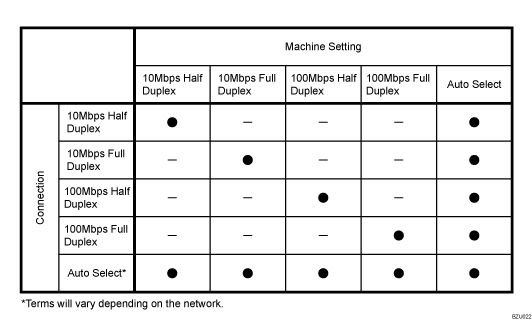
Ping Command
Check the network connection with ping command using given IPv4 address.
If you fail to connect to the network, check the following, and then retry the ping command.
Make sure that "IPv4" in [Effective Protocol] is set to [Active].
Check that the machine with assigned IPv4 address is connected to the network.
There is a possibility that the same IPv4 address is used for the specified equipment.
Permit SNMPv3 Communication
Set the encrypted communication of SNMPv3.
Default: [Encryption / Cleartext]
If you select to [Encryption Only], you need to set an encryption password for the machine.
Permit SSL / TLS Communication
Set the encrypted communication of SSL/TLS.
Default: [Ciphertext Priority]
If you set to [Ciphertext Only], you need to install the SSL certificate for the machine.
Host Name
Specify the host name.
Enter the host name using up to 63 characters.
Machine Name
Specify the machine name.
Enter the machine name using up to 31 characters.

For details on how to access System Settings, see "Accessing User Tools".


