




Booklet Finisher SR5020
This section describes how to attach the Z-fold support tray for Booklet Finisher SR5020 to the finisher shift tray.
 Press the [Suspend/Resume] key.
The key lights up.
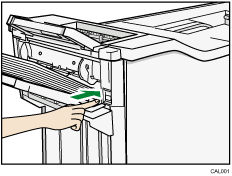
 Remove the prints.
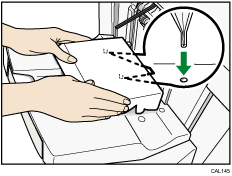
 Set the Z-fold support tray for the finisher shift tray.
Attach the Z-fold support tray by inserting the two protrusions on its underside into the holes on the finisher shift tray.
 Press the [Suspend/Resume] key.
The key turns off, and then printing restarts.

