




Manually Specifying a Paper's Size and Type
 Press the [Paper Setting] key.
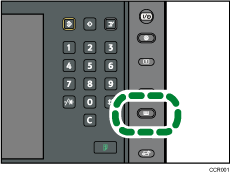
The control panel on your machine might differ slightly from the control panel in this illustration.
 Select the number of the tray whose paper settings you want to specify.
 Press [Tray Paper Settings Screen].
 Change the paper settings, and then press [OK].
 If you are using the Pro C901S, change the settings for the copy function (such as Designation Sheet 1
 9 and Front Cover Sheet), if necessary.
 Press the [Paper Setting] key.
You can also close the Tray Paper Settings screen by pressing [Exit].

