












 Manuals
 Contents
 Previous
 Next
Next


| | | |
| |||
| |||
| | | |
| ManualsContentsPreviousNext | | |
This section introduces the names and functions of the components.

Do not obstruct the ventilation holes by placing objects near them or leaning things against them. If the machine overheats, a fault might occur.
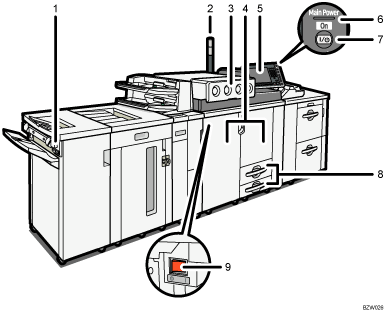
Suspend/Resume switch
Press to momentarily stop printing. Pressing again resumes the stopped operation.
Attention light
Notifies you of errors during printing, such as paper jam and out of paper.
Toner cover
Open to change the toner container.
Front cover (front right /left cover)
Open to access the inside of the machine.
Control panel
See "Control Panel".
Main power indicator
The main power indicator goes on when you turn on the main power switch.
Operation switch
Press to turn the power on (the operation switch indicator lights up). To turn the power off, press again (the operation switch indicator goes off). See "Turning On/Off the Power".
Paper tray (tray 1, 2)
Load paper here.
Main power switch
If the machine does not operate after turning on the operation switch, check if the main power switch is turned on. If it is off, turn it on. See "Turning On/Off the Power".
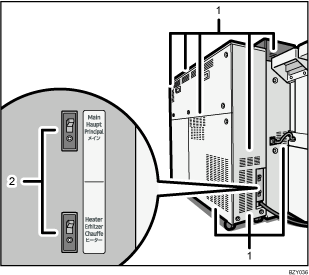
Ventilation holes
Prevent overheating.
Earth breakers
Main breaker (top): Cuts the flow of electricity from the main power supply if a current overload occurs.
Heater breaker (bottom): Cuts the flow of electricity to the heater if a current overload occurs.
 |
 | Copyright (C) 2010 |

