












 Manuals
 Contents
 Previous
 Next
Next


| | | |
| |||
| |||
| | | |
| ManualsContentsPreviousNext | | |
When an indicator to the right of a function key is lit, press the corresponding function key. Then, follow the instructions displayed on the control panel.
The following illustration shows the indicator of the copy function key as an example.
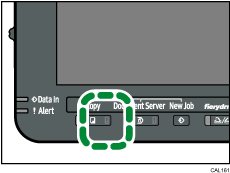
If a function error occurs, check the message that appears on the control panel, and then see "Messages Displayed" for the relevant function.
The following table explains problems that cause the indicator to light.
Problem |
Causes |
Solutions |
|---|---|---|
Documents and reports do not print out. |
The paper output tray is full. |
Remove prints from the tray. |
Documents and reports do not print out. |
There is no paper left. |
Load paper. See Loading Paper. |
An error has occurred. |
The function is not working properly. |
Record the code number shown on the display, and then contact your service representative. See "Messages Displayed" of each chapter. You can use the other functions as normal. |
The machine is unable to connect to the network. |
A network error has occurred. |
|
 |
 | Copyright (C) 2010 |

