












 Manuals
 Contents
 Previous
 Next
Next


| | | |
| |||
| |||
| | | |
| ManualsContentsPreviousNext | | |
If the orientation in which your original is placed is different from that of the paper you are copying onto, the machine rotates the original image by 90 degrees to fit it on the paper.
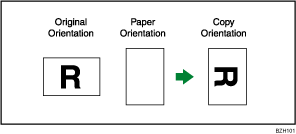

This function works when Auto Paper Select or Auto Reduce / Enlarge is selected. See "Auto Paper Select" and "Auto Reduce / Enlarge".
The default setting for Auto Tray Switching is [On]. You cannot use the Rotate Copy if this setting is changed to [Off]. For details about Auto Tray Switching, see "Copier/Document Server Features", General Settings Guide.
Depending on the settings for the Punch, Staple or Z-fold functions, you may not be able to use the Rotated Copy function.
 |
 | Copyright (C) 2010 |

