












 Manuals
 Contents
 Previous
 Next
Next


| | | |
| |||
| |||
| | | |
| ManualsContentsPreviousNext | | |
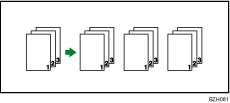
The machine assembles copies as sets in sequential order.
Sort/Shift Sort
Copies are assembled as sets in sequential order.
To use Shift Sort, Finisher SR5000, Booklet Finisher SR5020, or the stacker is required. Each time the copies of one set or a job are delivered, the next copy is shifted to separate each set or job.
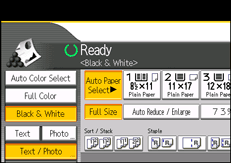
Select the Sort function ( ) under Sort / Stack.
Enter the number of copies with the number keys.
Place the originals.
To confirm the type of finishing, press the [Sample Copy] key.
Press the [Start] key.

When the number of copies exceeds tray capacity, copying stops. If this happens, remove copies from the tray to resume copying. For details about the number of copy sheets that the output tray can accommodate, see "Specifications for Finisher SR5000", "Specifications for Booklet Finisher SR5020", or "Specifications for Stacker", About This Machine.
If you are copying from the exposure glass, a single copy of each original is made first. If the first copy set is acceptable, you can make the remaining copy sets by pressing the [ ] key. The time required for copy sets to be delivered varies depending on the print settings.
When placing an original on the exposure glass, start with the first page to be copied. When placing originals in the ADF, set so that the first page is on the top.
When placing originals on the exposure glass, or in the ADF using Batch mode, press the [] key after all the originals have been scanned.
You can change the settings for Sort under Input / Output in User Tools. For details, see "Copier/Document Server Features", General Settings Guide.
 |
 | Copyright (C) 2010 |
