



About Menu and Mode
There are two modes available with Web Image Monitor: guest mode and administrator mode.
Displayed Items may differ depending on the machine type.
About Guest Mode
In the guest mode, machine status, settings, and print job status can be viewed, but the machine settings cannot be changed.
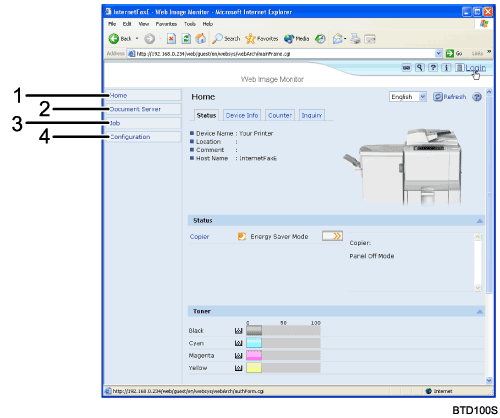
Home
The [Status], [Configuration], [Counter], and [Inquiry] tab are displayed. Details of the tab menu are displayed on the work area.
Document Server
Display files stored in the Document Server.
Job
Display all print files.
Configuration
Display current machine and network settings.
Administrator Mode
In the administrator mode, you can configure various machine settings.
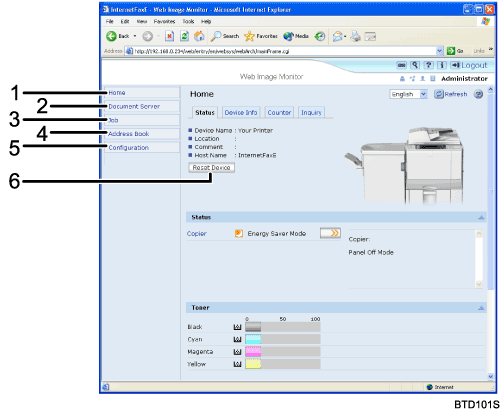
Home
The [Status], [Configuration], [Counter], and [Inquiry] tab are displayed. Details of the tab menu are displayed on the work area.
Document Server
Display files stored in the Document Server.
Job
Display all print files.
Address Book
User information can be registered, displayed, changed, and deleted.
Configuration
Make system settings for the machine, interface settings, and security.
Reset Device
Click to reset the machine. If a print job is being processed, the machine will be reset after the print job is completed. This button is located on Top Page.

