



Rotate Copy
If the orientation in which your original is placed is different from that of the paper you are copying onto, the machine rotates the original image by 90° to fit it on the paper.
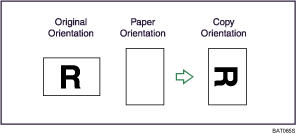

This function works when Auto Paper Select or Auto Reduce / Enlarge is selected. See “Auto Paper Select” and “Auto Reduce/Enlarge”.
The default setting for Auto Tray Switching is [With Image Rotation]. You cannot use the Rotate Copy if this setting is changed to [Without Image Rotation] or [Off]. For details about Auto Tray Switching, see “Copier/Document Server Features”, General Settings Guide.
Depending on the settings for the Punch, Staple or Z-fold functions, you may not be able to use the Rotated Copy function.


