












 Contents
 Previous
 Next
Next


| | | |
| |||
| |||
| | | |
| ContentsPreviousNext | | |
Follow the procedure below to use the paper tray extension for paper larger than A4/Letter size, such as Legal size paper.
Hold the Tray 2/Tray 3 grip, pull the tray halfway out, lift it slightly ( ), and then pull it out further (
 ).
).
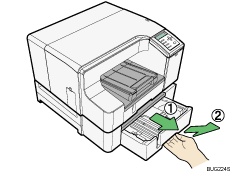
Pull tray 2/tray 3 completely out. Take care not to drop it.
Slide the tabs on both sides of the tray's interior to the unlocked position.
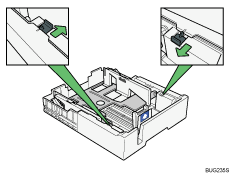
Pull out the paper tray extension.
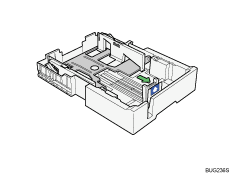
Slide the tabs back into place to lock the paper tray extension into position.
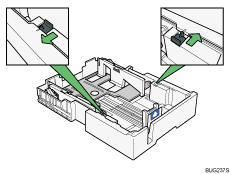
While squeezing the catch on the paper guide, slide the guide so it is positioned according to the paper size.

Do not use the paper tray extension for A4 (Letter) size paper or smaller paper. Use it only for long paper.
Beforehand, make sure to squeeze the front end paper guide, and then expand the guide.
Load paper with the print side face down but not over the limit mark.

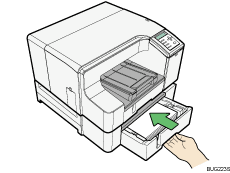
Push tray 2/tray 3 gently in until it stops.
 |
 | Copyright (C) 2009 |
