












 Contents
 Previous
 Next
Next


| | | |
| |||
| |||
| | | |
| ContentsPreviousNext | | |

|
Make sure the printer's power cord is unplugged.
Take the paper feed unit out of its box.
Position the paper feed unit close to the printer.
Remove the orange tape from the paper feed unit.
Align the connecting parts of the printer and paper feed unit, and then lower the printer onto the paper feed unit.
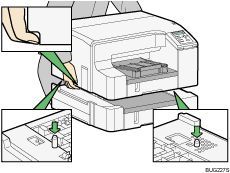
After attaching the paper feed unit, you must register where to start printing on paper loaded in the paper feed unit.

Align the paper feed unit and printer using their corners.
When the printer is placed on top of the paper feed unit, installation is complete.
Do not tilt the printer.
Be careful not to trap your fingers.
Up to two paper feed units can be attached.
To install two paper feed units, put the upper paper feed unit (tray 2) on the lower paper feed tray (tray 3) first, and then lower the printer onto the upper paper feed unit (tray 2).

For details about registering where to start printing on paper loaded in the paper feed unit, see Registration.
 |
 | Copyright (C) 2009 |
