












 Contents
 Previous
 Next
Next


| | | |
| |||
| |||
| | | |
| ContentsPreviousNext | | |
This is a rear view of the printer.
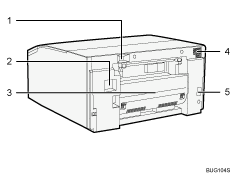
USB slot
Connect the USB cable from the computer here.
Ethernet port
Use a network interface cable to connect the printer to a network.
Duplex Unit
Turns the paper over when performing duplex printing.
Vent
Air is vented here to prevent the inside of the printer from getting too warm. Do not lean anything against the vent or block it in any way. If the inside of the printer gets too warm, a breakdown could occur.
Power inlet
Plug the power cord.
Plug one end of the power cord into the printer's power inlet and the other end into a wall outlet.
Connect the grounding wire attached to the power plug directly to a grounding terminal.
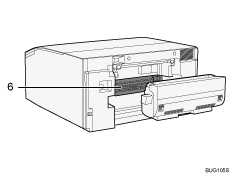
Guide board
To remove paper that has jammed inside the printer, open the guide board by removing the duplex unit.
 |
 | Copyright (C) 2009 |
