












 Contents
 Previous
 Next
Next


| | | |
| |||
| |||
| | | |
| ContentsPreviousNext | | |
If the machine is connected to the telephone network through a PBX, set the dial number to access the outside line.

Make sure to set the outside line access number that matches the setting of your PBX. Otherwise, you may not be able to send faxes to outside destinations.
Press the [User Tools] key.
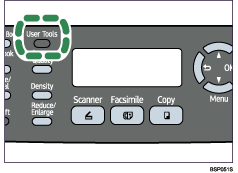
Press the [ ][
][ ] keys to select [Admin Settings], and then press the [OK] key.
If you are requested to enter a password, enter the password using the number keys, and then press the [OK] key.
Press the [][] keys to select [PBX Access Digit], and then press the [OK] key.
Enter the outside line access number using the number keys, and then press the [OK] key.
Confirm the setting, and then press the [ ] key.
Press the [Clear/Stop] key to return to the initial screen.

You can press the [] key to exit to the previous level of the menu tree.
A password for accessing the [Admin Settings] menu can be specified in [Admin Menu Lock].

For details about [Admin Menu Lock], see Administrator Settings.
 |
 | Copyright (C) 2009 |
