




Backing Up the Machine's Settings
Click the [Backup Settings] tab on the administrator settings page to create backup files containing the machine's configuration settings. If necessary, these backup files can be used to restore previous configurations.

When sending the machine for repair, it is important that you create backup files in advance. The machine's settings are returned to the default after repair.
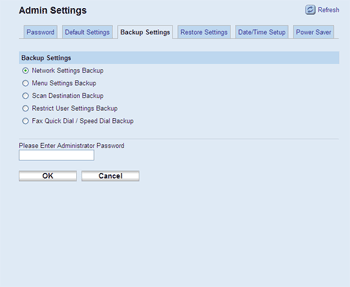
Item |
Description |
|---|---|
Network Settings Backup |
Backs up settings configured on the [Network Status], [Network Application], [DNS], [Alert Messages], [SNMP], and [SMTP] pages, as well as the administrator password for Web Image Monitor. |
Menu Settings Backup |
Backs up the menu settings that are not related to the network. |
Scan Destination Backup |
Backs up scan destinations to a file. |
Restrict User Settings Backup |
Backs up user restriction settings to a file. |
Fax Quick Dial / Speed Dial Backup |
Backs up fax Quick Dial and Speed Dial settings to a file. |
Follow the procedure below to create configuration backup files.
 Select the radio button for the type of data you wish to back up.
 Enter the administrator password if required.
 Click [OK].
 Click [Save] in the confirmation dialog box.
 Navigate to the location to save the backup file.
 Specify a name for the file, and click [Save].

