




Inserting Extra Pages
You can insert a sheet after a specified page. For chapter breaks, you can insert a blank page before a specified page, so that when duplex printing is set, the specified page will be printed on the front side of the page.
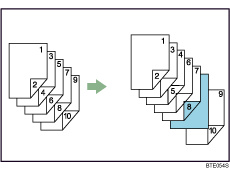

Using the printer driver, you can insert up to 100 extra pages within a job.
When the [Spool data in EMF format] check box has been selected in the [Advanced] menu, or booklet printing has been set, this function cannot be selected.
When PCL5e is specified as the page description language, this function cannot be selected.
For details, see the printer driver Help.

