




Using this machine as the Windows printing port
Network connections can be established through Ethernet.
Available ports are determined based on the combination of Windows operating system version and connection method used.
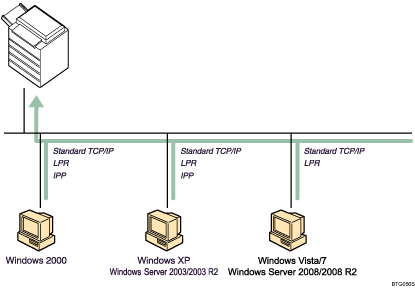
Connection Method |
Available Ports |
|---|---|
|
|
Connection Method |
Available Ports |
|---|---|
|
|

See the explanation about how to install the printer driver for each type of port.
For details about Standard TCP/IP port, see "Installing the Printer Driver (Standard TCP/IP Port)".
For details about LPR port, see "Installing the Printer Driver (LPR Port)".
For details about IPP port, see "Installing the Printer Driver (IPP Port)".


