




Connecting to the IEEE 1284 Interface
This section describes how to connect the IEEE 1284 interface cable to the IEEE 1284 interface board.

|
 Make sure the main power is switched off.
 Turn off the main power switch of the host computer.
 Connect the IEEE 1284 interface cable to the IEEE 1284 port.
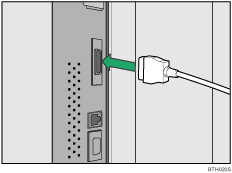
You might have to use a conversion adapter to connect the cable to the interface. For details about acquiring a conversion adapter, consult your sales or service representative.
 Connect the other end of the cable into the interface connector on the host computer.
Check the shape of the connector to the computer. Connect the cable firmly.
 Turn on the main power switch of the printer.
 Turn on the host computer.
A printer driver installation screen might appear when the computer is turned on. If this happens, click [Cancel] on the screen.

For details about how to turn on the main power switch, see "Turning On the Main Power", About This Machine.
For details about installing the printer driver, see "Preparing the Machine", Printer Reference.

