




Locking the Large Capacity Tray
This section explains how to lock the optional LCT.

A padlock is not supplied with the optional LCT. For details about the padlocks we recommend, contact your service representative.
If you are providing the padlock yourself, check that it conforms to the dimensions shown below.
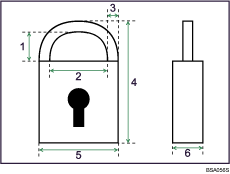
4.5 mm (0.2 inches) or more
8 mm (0.4 inches) or more
4 mm (0.2 inches) or less
42 mm (1.7 inches) or more
24 mm (1.0 inch) or less
13 mm (0.6 inches) or less
 Open the LCT front cover.
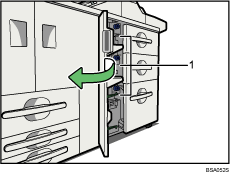
Padlock fittings
 Slide the padlock fitting to the right.
Padlock fittings are on the left side of each tray.
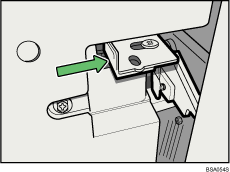
 While pushing the padlock fitting to the right, push the hook of the padlock through the hole, and then close the padlock.
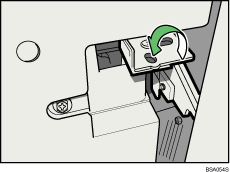
 Close the LCT front cover.

To unlock the optional LCT, perform the steps of the lock procedure in reverse.

