












 Contents
 Previous
 Next
Next


| | | |
| |||
| |||
| | | |
| ContentsPreviousNext | | |
Follow the procedure below to print the configuration page.
Press the [User Tools] key.
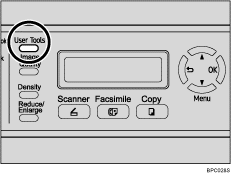
Press the [ ][
][ ] keys to select [Reports Print], and then press the [OK] key.
| Menu Reports Print |
Press the [][] keys to select [Configuration Page], and then press the [OK] key.
| Reports Print Configuration Pa |
The configuration page is printed.
 |
 | Copyright (C) 2008 |
