












 Manuals
 Contents
 Previous
 Next
Next


| | | |
| |||
| |||
| | | |
| ManualsContentsPreviousNext | | |
This section describes loading paper that has a specified orientation and printing side (such as letterhead paper).
Orientation-fixed (top to bottom) or two-sided paper (for example, letterhead paper, punched paper, or copied paper) might not print correctly, depending on how the originals and paper are placed. Set [Letterhead Setting] to [On] under [Copier Features], and then place the original and paper as shown below. For details about Letterhead Setting, see "Copier Features", Copy Reference . For details about printing with the printer function, see "Printer Features", Printer Reference.
Original Orientation
Exposure glass |
ADF |
||
|---|---|---|---|
*1 |
|
*1 |
|
*1 When making copies using the duplex function in this orientation by setting [Always Specify] for [Orientation] with [Copier Features] in User Tools, specify  for the original orientation.
*2 When making copies using the duplex function in this orientation, and loaded paper orientation is  , place originals as shown below.

Under [Copier Features], if [Orientation] is set to [Always Specify], load paper in  orientation.
Paper Orientation
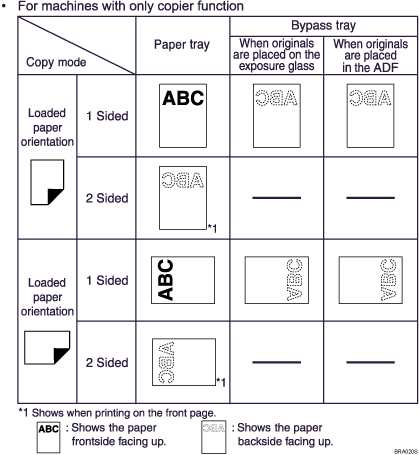
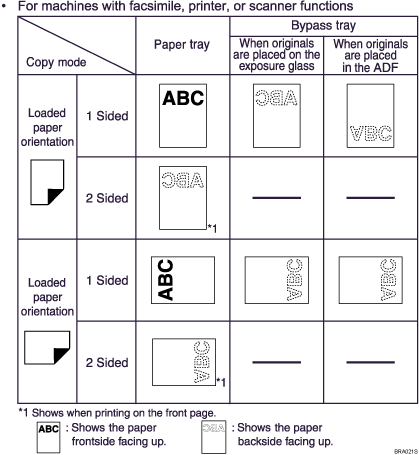

In [Tray Paper Settings] under [System Settings], specify [Letterhead] for "Paper Type" of the paper tray you want to use. This setting is only available when the printer/scanner and fax units are installed. See "Tray Paper Settings", Network and System Settings Guide.
 |
 | Copyright (C) 2008 |


