












 Manuals
 Contents
 Previous
 Next
Next


| | | |
| |||
| |||
| | | |
| ManualsContentsPreviousNext | | |
If you want to use the paper size and feed direction that are not indicated on the paper size dial, set the dial to " ". In this case, you should set the paper size using the control panel. Follow the procedure described below to set the paper size.
Press the [Menu] key.
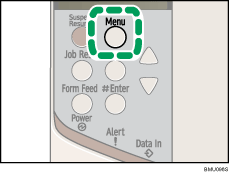
The [Menu] screen appears.
Press the [ ] or [
 ] key to display [Paper Input], and then press the [
 Enter] key.
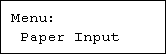
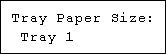
Press the [] or [] key to display [Tray Paper Size], and then press the [ Enter] key.
Press the [] or [] key to display the target paper tray, and then press the [ Enter] key.
Press the [] or [] key to display the loaded paper size, and then press the [ Enter] key.
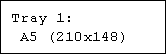
After about two seconds, the display returns to the menu.
Press the [Menu] key.
The initial screen appears.
This completes the setting change.
 |
 | Copyright (C) 2008 |
