




Reproduction Ratio
This section describes the user tools in the Reproduction Ratio menu under Copier / Document Server Features.
Default settings are shown in bold type.
User Reduce/Enlarge Ratio
You can register up to three frequently used Reduce / Enlarge ratios other than the fixed Reduce / Enlarge ratio and have them shown on the initial display. You can also change registered Reduce / Enlarge ratios.
When you select [User Reduce/Enlarge Ratio] on the copier screen, the ratio can be set from 25.0 to 400.0%, using the number keys.
Metric version:
The default setting for "F1" is 70.7%.
The default setting for "F2" is 141.4%.
The default setting for "F3" is 200.0%.
Inch version (Engineering):
The default setting for "F1" is 64.7%.
The default setting for "F2" is 129.4%.
The default setting for "F3" is 200.0%.
Inch version (Architecture):
The default setting for "F1" is 66.7%.
The default setting for "F2" is 133.3%.
The default setting for "F3" is 200.0%.
Reproduction Ratio
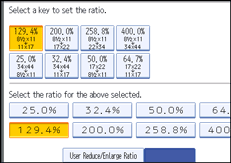
Specify the enlargement and reduction ratios that appear if [Reduce / Enlarge] is pressed on the copier screen.
When you select [User Reduce/Enlarge Ratio], the ratio can be set from 25.0 to 400.0%, using the number keys.
Metric version:
25.0% (A0
 A4)
A4)35.4% (A1
A4, A0 A3)50.0% (A2
A4, A1 A3)70.7% (A3
A4, A1 A2)141.4% (A4
A3, A2 A1)200.0% (A4
A2, A3 A1)282.8% (A4
A1, A3 A0)400.0% (A4
A0)
Inch version (Engineering):
25.0% (E
A)32.4% (D
A, E B)50.0% (C
A, D B, E C)64.7% (B
A, C B, D C, E D)129.4% (A
B, B C, C D, D E)200.0% (A
C, B D, C E)258.8% (A
D, B E)400.0% (A
E)
Inch version (Architecture):
25.0% (E
A)33.3% (D
A, E B)50.0% (C
A, D B, E C)66.7% (B
A, C B, D C, E D)133.3% (A
B, B C, C D, D E)200.0% (A
C, B D, C E)266.7% (A
D, B E)400.0% (A
E)
Reduce/Enlarge Ratio Priority
You can set the ratio that has priority when [Reduce / Enlarge] is pressed.
The default setting is 70.7% (Metric version) / 64.7% (Inch version: Engineering) / 66.7% (Inch version: Architecture).
Magnification Key Display
Specify which scale's reproduction ratios shown on the initial display.
The default setting is Engineering.
User Auto Reduce / Enlarge: A0-A4, B1 JIS-B4 JIS
Define a user auto reduce/enlarge ratio for each document size when copying with the User Auto Reduce / Enlarge feature.
[Off] determines whether to display a defined user auto reduce/enlarge ratio on a copier screen.
Select one of the following paper sizes for a user auto reduce/enlarge ratio defined for each document size:
34
 44
4422
3417
2211
1781/2
1136
4824
3618
2412
189
12


