




Connecting to the Interfaces
This section describes how to identify the machine's interface and connect the machine according to the network environment.

A network interface cable with a ferrite core must be used for RF interference suppression.
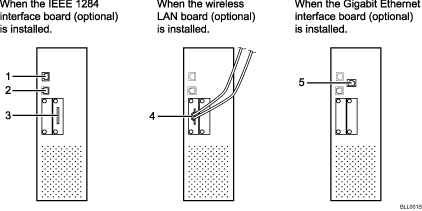
10BASE-T/100BASE-TX port
Port for connecting the 100BASE-TX or 10BASE-T cable
USB2.0 port
Port for connecting the USB2.0 interface cable
IEEE 1284 ports (optional)
Port for connecting the IEEE 1284 interface cable
Wireless LAN port (optional)
Port for using the wireless LAN
Gigabit Ethernet port (optional)
Port for using the 1000BASE-T, 100BASE-TX, or 10BASE-T cable

Some options cannot be attached to the machine if other options are already attached. For details about what combinations of options are possible, contact your sales or service representative.
If the optional Gigabit Ethernet board is installed, the 10BASE-T/100BASE-TX port on the board cannot be used.


