












 Manuals
 Contents
 Previous
 Next
Next


| | | |
| |||
| |||
| | | |
| ManualsContentsPreviousNext | | |
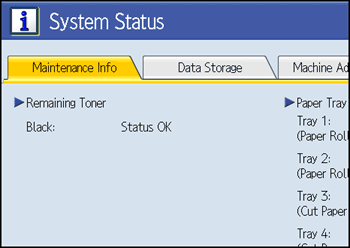
You can check the machine's system status.
Maintenance Info
You can check the following items under [Maintenance Info]:
[Remaining Toner]
Displays the amount of remaining toner.
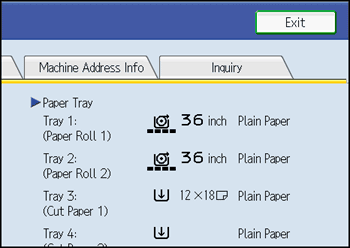
[Paper Tray]
Displays the paper type and size loaded in the paper tray.
[Original Misfeed]
Displays state of and solutions for original misfeeds.
[Paper Misfeed]
Displays state of and solutions for paper jams.
[Cover Open]
Indicates whether front cover, scanner cover, etc., is open.
Data Storage
You can check the following items under [Data Storage]:
[HDD Remaining Memory]
Displays the amount of available hard disk drive memory.
[HDD File(s)]
Displays the total number of jobs stored in the hard disk drive.
[Print Job(s)]
Displays the number of jobs for "Hold Print", "Stored Print", "Locked Print", and "Sample Print".
[Memory Erase Status]
Displays the state of the memory data.
Machine Address Info
You can check the following items under [Machine Address Info]:
[Machine IPv4 Address]
Displays the machine's IPv4 address.
[Machine IPv6 Address]
Displays the machine's IPv6 address.
Inquiry
You can check the following items under [Inquiry]:
[Machine Repairs]
Displays the machine number and contact number that are required for service.
[Sales Representative]
Displays the sales representative's telephone number.
[Supply Order]
Displays the contact number for placing supply orders.
[Supply Details]
Displays the name of toner used on the machine.
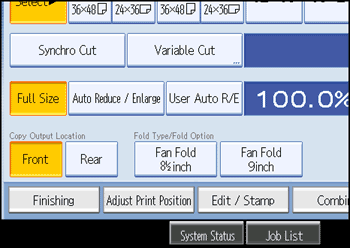
On the control panel, press [System Status].
Press each tab and check the contents.
After checking the information, press [Exit]. The previous screen returns.

[Original Misfeed], [Paper Misfeed], and [Cover Open] appear on the [Maintenance Info] tab only when these errors occur.
For details about how to locate and remove misfeeds, see "Removing Jammed Paper".
 |
 | Copyright (C) 2008 |

